
One-click updates
What it is
The Emporium Client is a free add-on you install once on your own forum. It connects your Admin CP to your account here, so it knows which of my add-ons you own, which versions you run, and which ones have a newer release waiting. Updating becomes a button: no download, no unzip, no FTP.
- Every purchase in one page, with its version, its support date and its installations.
- Update one add-on, or all of them at once, after your XenForo and PHP versions are checked.
- Install an add-on you own but never installed, in one click.
- Security releases flagged in red, on the page, on your Admin CP home and by email.
- A health page and a support report you can paste into a ticket.
Before you start
- XenForo 2.3 and PHP 8.0 or later, with the
zipandopensslextensions. Almost every host has both. - An administrator account allowed to manage add-ons.
- Your forum must be able to reach
xen-support.comover HTTPS. If your host blocks outgoing connections, the Health page tells you.
1. Download it
Open Emporium Client in the store and press Get it free. It lands in your licences like any other purchase, with its ZIP.
2. Install it
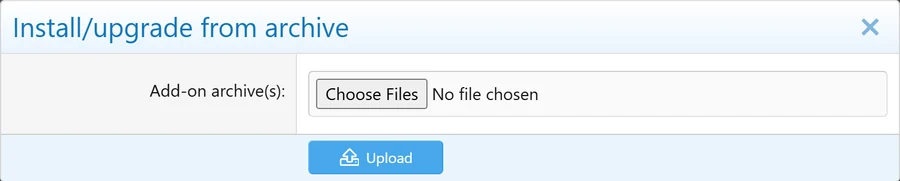
In your Admin CP, go to Add-ons, press Install/upgrade from archive, choose the ZIP and confirm. If your host blocks archive installs, upload the upload folder by FTP and install it from the Add-ons page, exactly as in Install an add-on.
3. Connect your forum
This takes about a minute and you only do it once.
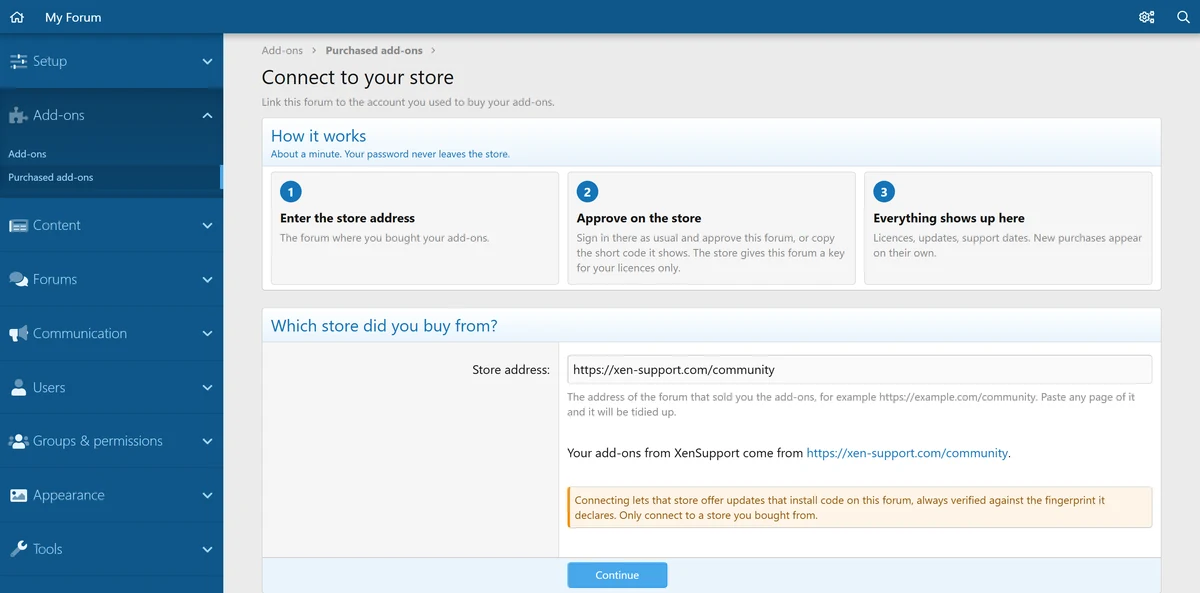
First, tell your forum where you bought. Go to Add-ons, Purchased add-ons. Enter https://xen-support.com/community and press Continue. Any page of the store works, the address is tidied up for you.
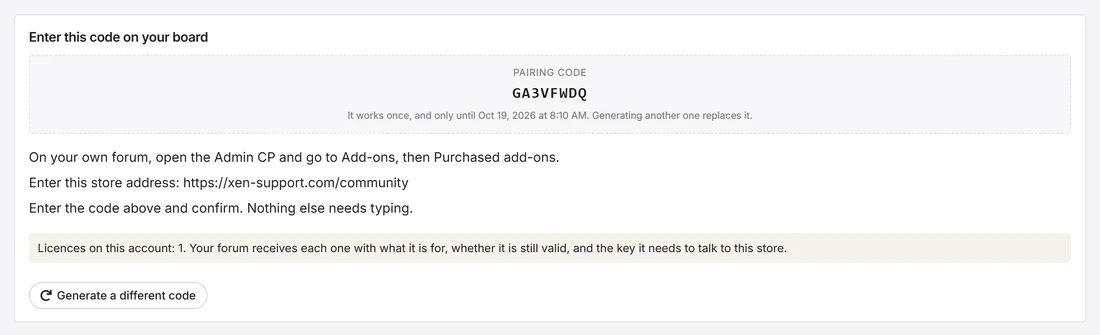
Then, get a code here. Your forum offers a button that opens Connect a board on this site. Sign in and press Generate a pairing code. The code works once and for 15 minutes.
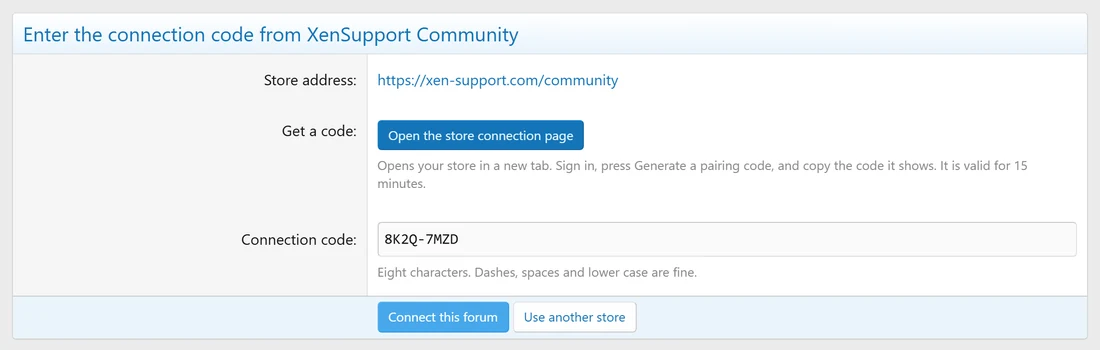
Finally, paste it. Back in your Admin CP, paste the eight characters and press Connect this forum. Dashes, spaces and lower case do not matter.
Your password never leaves this site. Your forum receives a key for your licences only, and you can see and disconnect every connected forum from the same Connect a board page.
4. Your purchases at a glance
Every licence on your account now appears, sorted by what needs you: Updates ready, Ready to install for what you own but never installed, then Up to date. Each line shows the version you run, the latest your licence covers, the end of your support, and how many installations the licence uses. When support ends within 30 days, a Renew button appears.
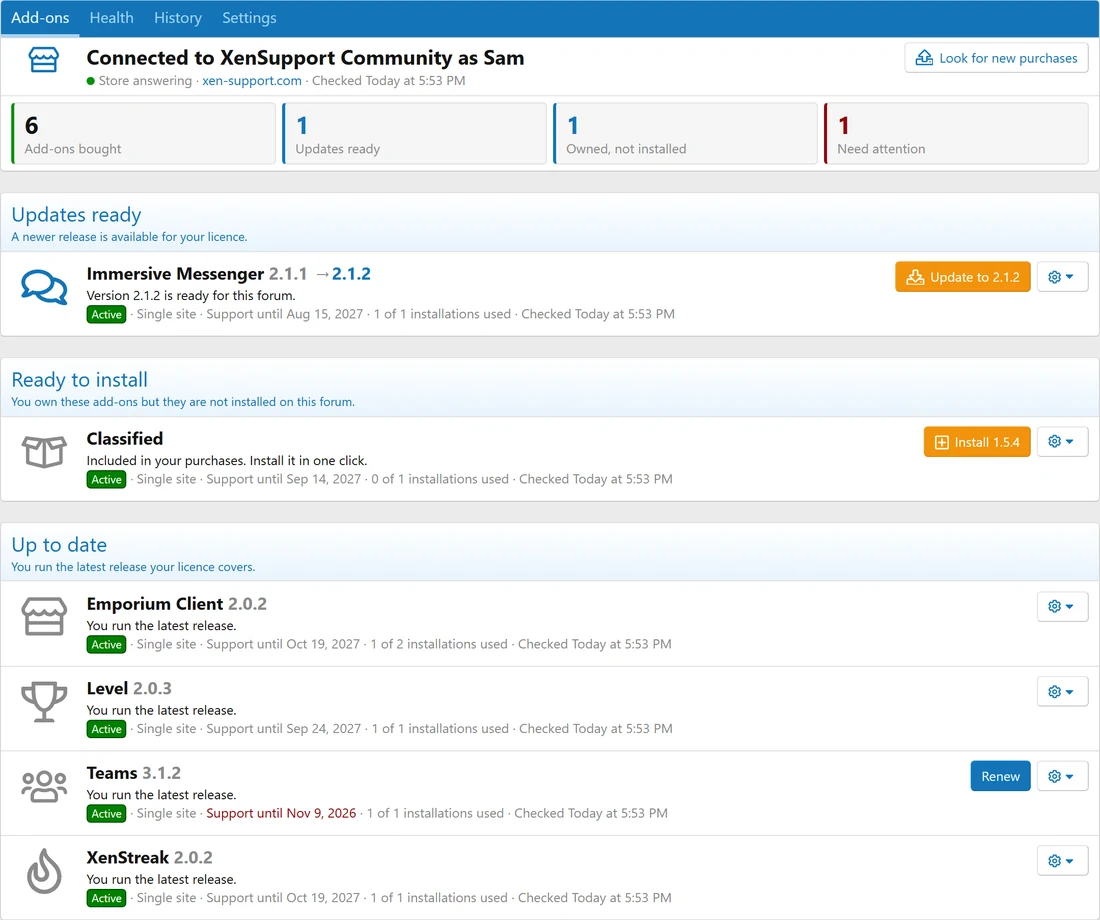
Bought something new later? Press Look for new purchases, or wait for the daily check.
5. Update in one click
Press Update to on one add-on, or Update all at the top of the page. Before anything happens, you see what will be installed and whether your XenForo and PHP versions are new enough. Then XenForo's own installer does the work, exactly as if you had uploaded the ZIP yourself.

Each package is checked against the fingerprint this store declared, and must contain the add-on it is for. If anything differs, the file is thrown away and nothing is installed. Your settings, permissions and data survive the update, as with any upgrade. A recent backup is always a good idea.
The History tab keeps every install, update and repair, with who did it.

6. Let it install on its own, if you want
Under Settings, choose what your forum may install by itself during its daily check: nothing, security releases only (the default), patches within the version you run, or everything your licence covers. You can set a different rule for one add-on, for example one you customised.
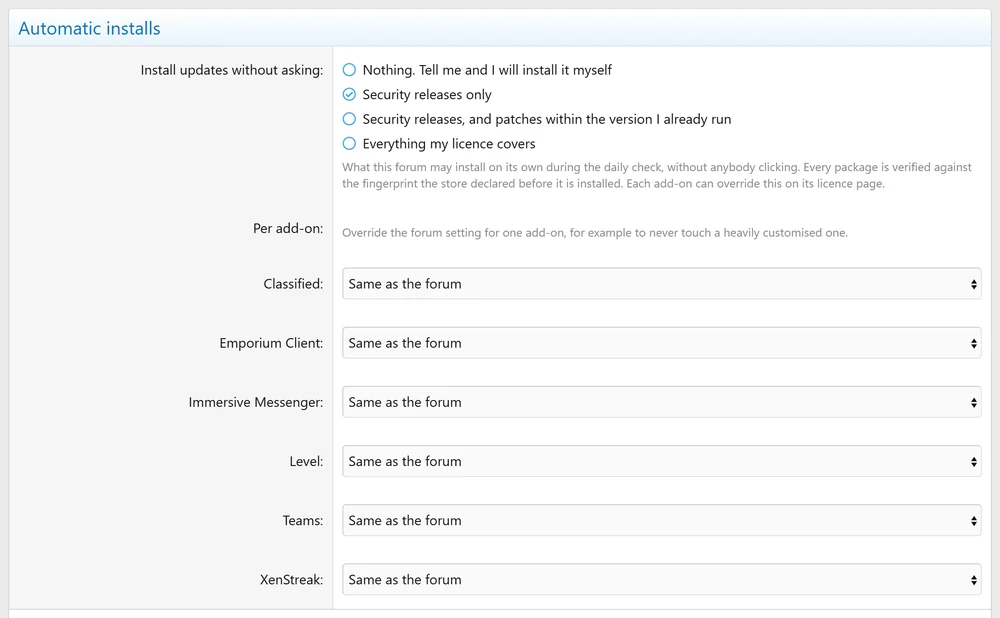
The same page chooses who receives the email when an update is waiting, and whether a short notice appears on your Admin CP home.

7. When something goes wrong
The Health tab checks what your forum needs to install updates, whether the daily check really runs, whether each add-on's files still match the release, and how many errors each one logged lately. If files were damaged or edited, Repair files reinstalls the same version over them.
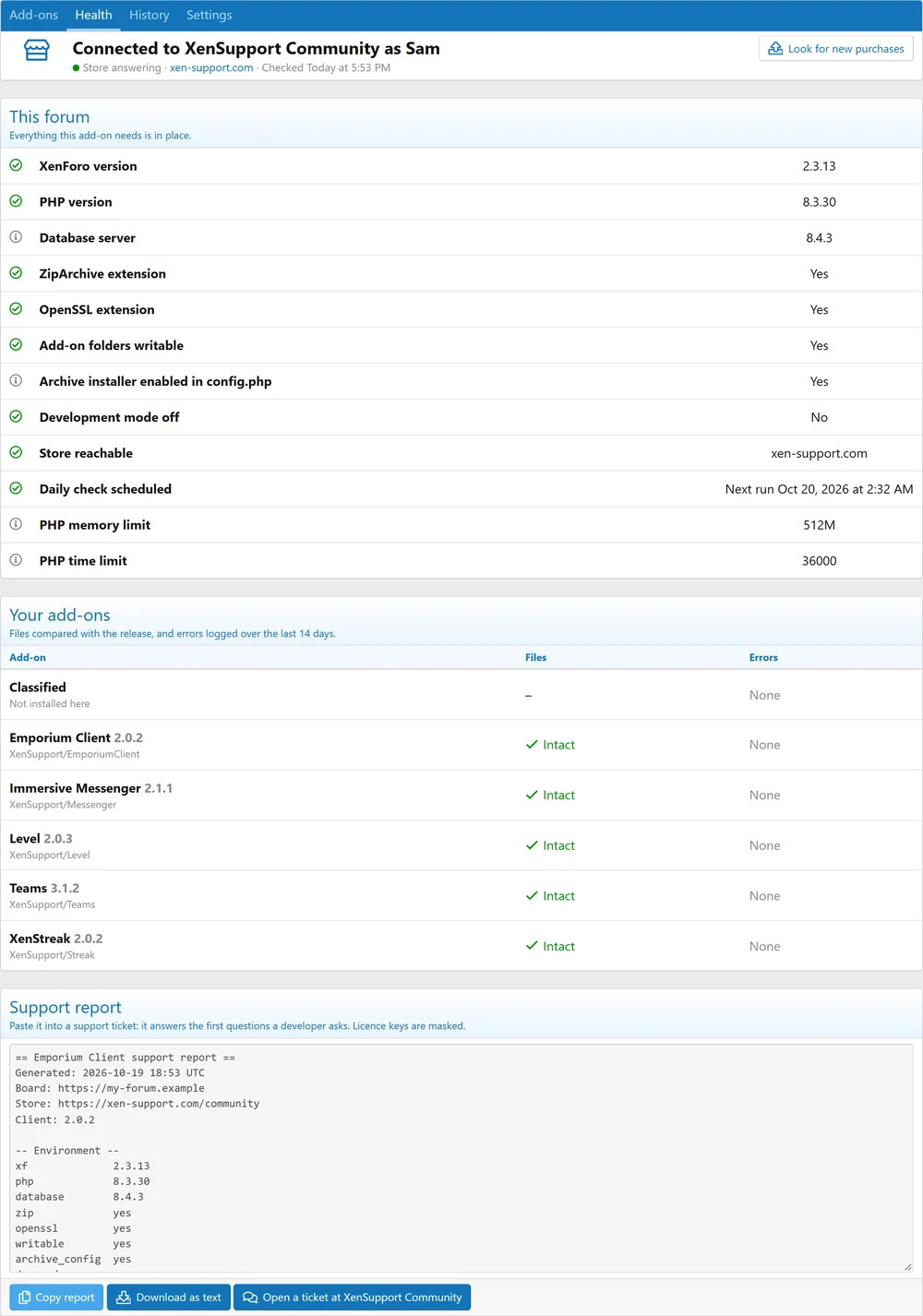
At the bottom, the support report sums all of it up, with licence keys masked. Copy it or download it, and paste it into your ticket: it answers the first questions before I have to ask them. The button next to it opens a ticket here.
Your licence, in detail
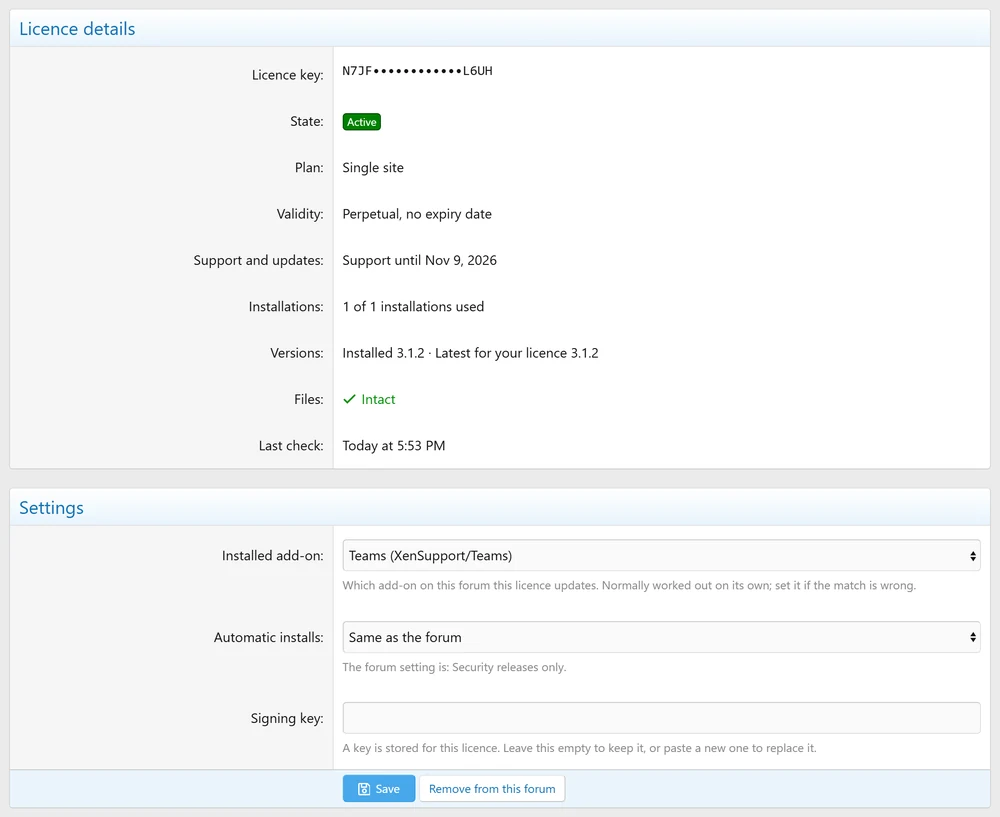
The cog on each line opens Licence details: plan, validity, support, installations, versions and file integrity. That is also where you correct the link between a licence and an add-on if it ever picks the wrong one.
Questions
What does my forum send?
Its address, its XenForo version, its PHP version and the versions of my add-ons installed on it. Nothing about your members, your content or your settings.
Does a test copy cost me an installation?
No. A domain ending in .local, .test, .invalid, .internal or running on localhost is recognised as development and never counts against your licence. Automatic installs pause while development mode is on.
I still have the old XenSupport Hub Connector.
It talked to a service that no longer exists. Uninstall it from Add-ons: the Emporium Client replaces it, and tells you so if both are installed.
I used Emporium Client 1.0 with licence keys.
Install 2.0 over it from the archive. Your licences, keys, settings and history are kept. Connecting with a code afterwards is optional, but it saves you adding future purchases by hand.
My forum moved to a new domain.
Start a conversation with me and the licence follows your forum the same day. Then connect again from the new address.
How do I disconnect?
In Settings, press Disconnect. Tick the box to also remove the licences from your forum, and their installation slots are given back here. You can also revoke a forum from Connect a board.

Premium XenForo add-ons, built, sold and supported by the developer himself. One-time payments, 12 months of updates, forums that answer back.