Shipped Some QoL suggestions

Frode

Elite
Customer
Verified licence
8 products BoardGameHub Emporium Client GameHub GroupFlair Journey Level Plans XenStaff
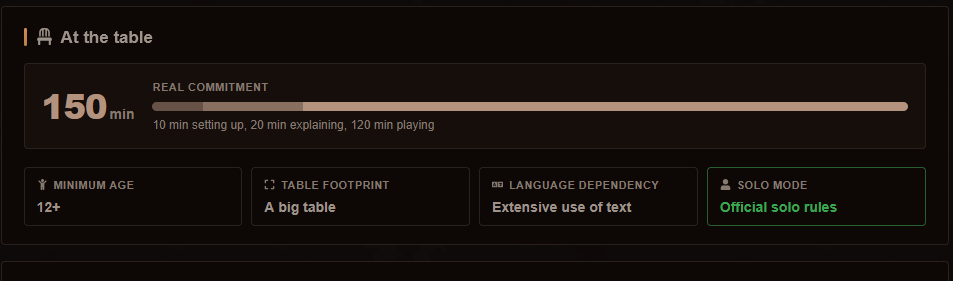
1. Question/Suggestion: Are all the boxes supposed to be colored like the rules one? (age, table foot, language dependency).
1787768901143.png

2. Question/Suggestion: Option to alter the text in the drop downs for "table footprint, language dependency, solo mode"? Can I just edit a phrase?

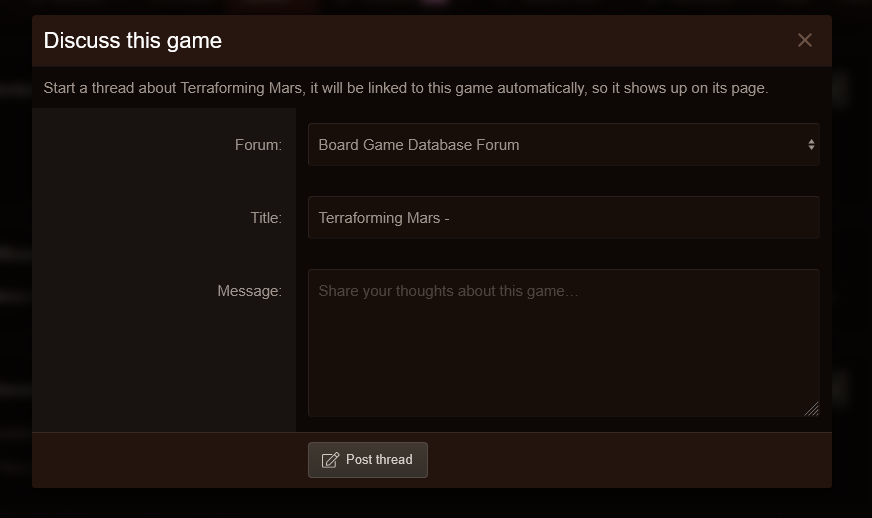
3. Option for "mandatory game name in thread title" in ACP, when the user clicks "title" in this screen, the cursor should start at "Terraforming Mars - [here]. And the before-mentioned part is greyed out, ie. he cannot change/delete it.
1787769075659.png

4. When selecting entry type expansion, stand-alone expansion and revised edition, add a check-mark for "copy content from base game". This will copy the following fields, which may be the same or very similar. This will save a lot of time when adding content manually! And they are just placeholders, the adding user can still just modify.

Advertised playtime
Players
Rules complexity
Strategic complexity
designer
publisher
tags
minimum age
illustrator
setup time
teaching time
table footprint
language depencency
solo mode
accessibility
categories
mechanics
 
Last edited:
All four are in 1.0.5, which is on the store now.

1. The coloured boxes​

You were right to ask. Only the solo cell could ever light up, so the colour looked arbitrary, because it was.

There is one rule now and it applies to every cell: a value is coloured only when that value changes the decision to get the box off the shelf.

  • Green for a game with official solo rules, and for one with no language dependency at all.
  • Amber for a huge table footprint, and for extensive or unplayable language dependency.
  • Plain for everything in between.
  • Minimum age is never coloured, because an age is neither good news nor bad. It tells you who can play, not whether to play.

The amber is a new Caution colour in the style properties, sitting beside the Success colour that was already there, so both follow your theme instead of borrowing the coming soon badge.

2. Rewording the dropdowns​

Yes, and your wording survives updates. I tested that rather than assuming it.

Every label is an ordinary XenForo phrase: xs_bgames_footprint_ for the footprint, xs_bgames_langdep_ for language dependency, xs_bgames_solo_ for solo mode. Edit them in your language, which is what the phrase editor does by default, and an add-on update will not touch them, because XenForo only overwrites the master copy.

To be sure, I rewrote all three, ran a real add-on upgrade, and checked the game form afterwards. The new wording was still on screen and the master copies were untouched.

3. Mandatory game name in thread titles​

New option, off by default: Lock the game name into discussion thread titles.

With it on, the game name is not inside the field at all. It sits next to it as a fixed prefix, so there is nothing to select, nothing to delete, and the cursor already starts exactly where you wanted it, right after "Terraforming Mars -". The member types only what the thread is about.

The full title is rebuilt on the server when the thread is posted, so the prefix holds even if someone edits the page in their browser. The character limit on the field is reduced by the length of the prefix, so a long game name cannot push the title over the limit.

4. Copy content from the base game​

Done, and it covers your whole list: players, advertised playtime, rules complexity, strategic complexity, designer, publisher, illustrator, minimum age, setup time, teaching time, table footprint, language dependency, solo mode, the three accessibility markers, categories, mechanics and tags.

Tick the box and the fields fill in as soon as a base game is chosen, with a line underneath telling you how many were copied and from which game. Three things worth knowing:

  • Only fields you left empty are filled. Anything you already typed is never overwritten, so you can tick the box halfway through and keep your work.
  • Everything stays editable, exactly as you asked. They really are placeholders.
  • It works with JavaScript off too, because the same copy runs again on the server when you save.

I put it on promo entries as well as expansions, standalone expansions and revised editions, since a promo shares the same details as the game it belongs to.

The title, the description and the BoardGameGeek id are deliberately never copied.

Thanks for these. All four made the add-on better, and the first one made me rewrite a rule that should never have been left to chance.
 
Thanks Gwendal, really appreciate the swift updates and fixes! :)
 
Where is this "an option to lock the game name into discussion thread titles"? In addon ACP "options" menu? :)
 
You could not find it because it is not there, and that is my fault rather than yours.

The switch exists and works, it is called Lock the game name into discussion thread titles, but five BoardGameHub settings shipped without being attached to the options group, so the Admin CP never draws them. The Read more threshold for play reports, the intro line above the page and the rating guide are in the same state. They all run on their defaults in the meantime.

That is fixed and goes out in the next update, with the five of them in the BoardGameHub options group where you went looking.

What the switch does, once you can reach it: a member who starts a discussion from a game page sees the game name as a fixed prefix they cannot edit or delete, and types only what follows. The full title is rebuilt when the thread is posted, so the prefix holds even if the page is tampered with.

Sorry for the slow answer, and thank you for asking. Nobody would have found this from the outside.
 
1.1.1 is out, and the switch is where you went looking: Admin CP, Setup, Options, BoardGameHub, called Lock the game name into discussion thread titles.

The four others that were in the same state are there too: the sentence printed above the page, the Read more threshold for long play reports, the rating guide, and the number of tips shown. Every default is unchanged, so nothing moves until you move it.
 
1789504261961.png

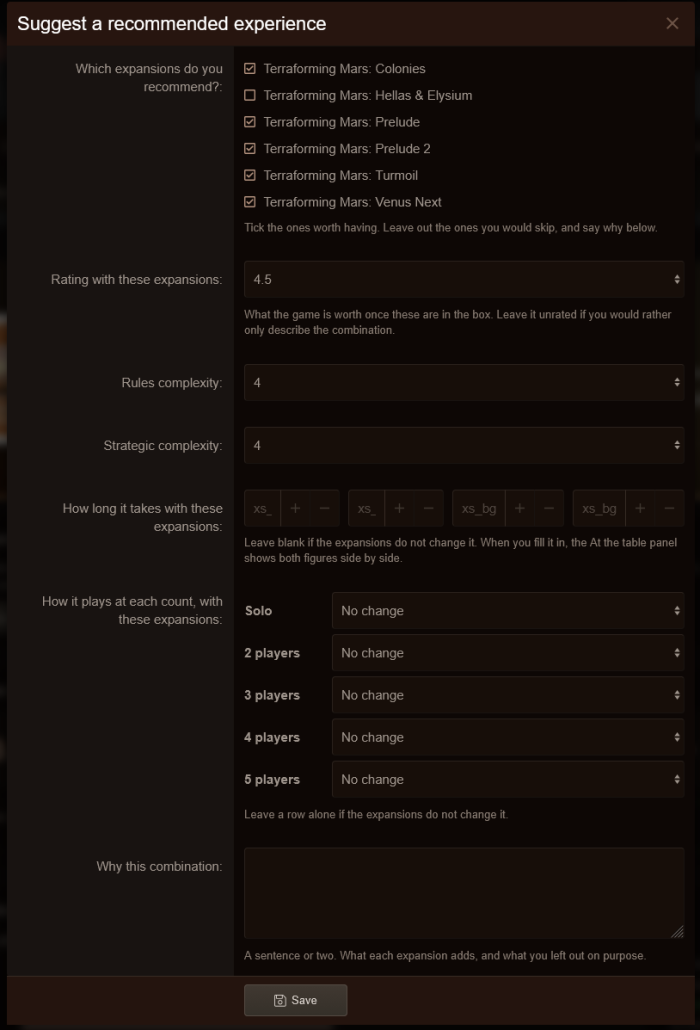
Some descriptions missing from the "how long it takes" fields.
 
Could you have a look? =)
Sorry for the wait, Frode, and thanks for the nudge.

You are right, and it was worse than a missing description. In the form where you suggest a combination of expansions, the four boxes under How long it takes with these expansions were asking for wording that was never shipped with the add-on, so nothing told you which box was which. Each box now has a real label above it: Setup time, Teaching time, Shortest play and Longest play, all in minutes.

Looking at that row turned up two more things:

  • The help text says to leave a box blank when the expansions change nothing, but the browser refused to save the form with an empty box. Same story on the add a game form, where minimum age, setup time, teaching time and the two ranges could not be left empty either. They can all be left blank now, as intended.
  • When you edit a play you logged, the time field had lost its label for the same reason. It reads Time at the table (minutes) again, like the form you logged it with.

All three are fixed on my side and go out with the next update, 1.1.2. I will post here the moment it is on the store.
 
1.1.2 is on the store now, Frode, as promised.

It carries the three fixes from my last message:
  • The four boxes under How long it takes with these expansions have their labels: Setup time, Teaching time, Shortest play and Longest play.
  • The number fields you are told to leave blank can be left blank, on the expansion form and on the add a game form.
  • The time field of a play you edit has its label back.
A few more things came along with it. Rating and year moved from the box art to a line under the title, so nothing covers a cover any more. My library opens on your collection, with a ring showing how much of your shelf has been played. The player count poll gives the verdict with expansions its own column. And alerts for new games now go out on boards that run their jobs from a server cron.

Changelog and download: https://xen-support.com/community/store/view/boardgamehub.29/
 
Ready to make your forum unforgettable?Browse the storeSee the plans
BoardGameHub
From the store

BoardGameHub

Your members already own the games. This is where the group finally decides what to play.

★ 5.0 · 1 review39.00€
View in store

Premium XenForo add-ons, built, sold and supported by the developer himself. One-time payments, 12 months of updates, forums that answer back.

Gwendal Grandhomme (EI) · SIREN 107 454 522 · France

Back
Top