• 🔑 Already a customer of xen-support.com?Your account is already here: log in with the same email and password as before. Your licenses, downloads and order history are waiting inside.Log inForgot password?

Suggestion can you fix small UX issue in XenStaff

club-home

Customer
Watch Party XenStaff XenStreak
Hi! Thanks for the Staff page, really looks nice.

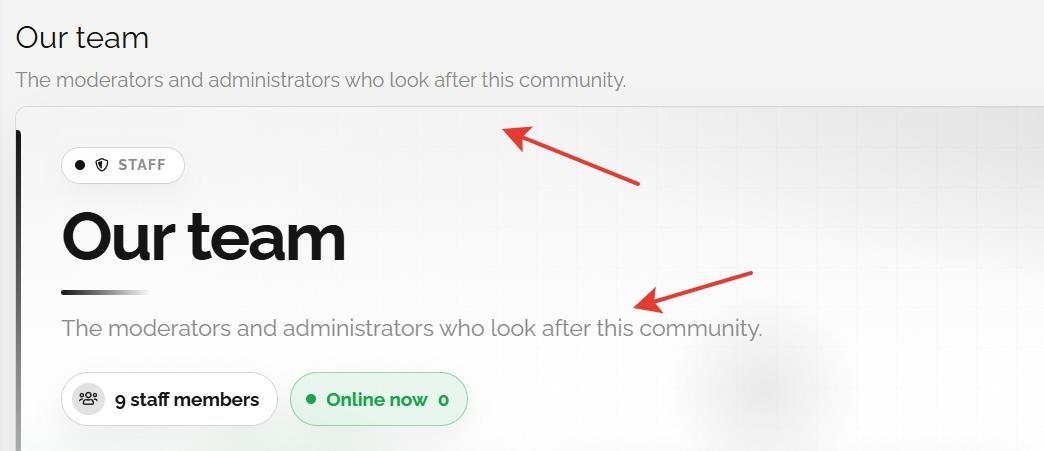
But can you fix small UX issue in XenStaff: the page title and description are rendered twice — once in XenForo's page header and again inside the add-on's hero banner (see attached screenshot). Both blocks share the same phrases, so editing the phrase changes both, and there's no way to have different text in the header and the hero.
Could you split them into separate phrases, e.g.:
  • xenstaff_page_title / xenstaff_page_description — for the page header;
  • xenstaff_hero_title / xenstaff_hero_description — for the hero banner.
Ideally with an option to hide one of the blocks entirely, so admins can choose: native header only, hero only, or both with different texts.
 

Attachments

  • 2026-08-28 20-41-42 Our team - Opera.jpg
    2026-08-28 20-41-42 Our team - Opera.jpg
    30.9 KB · Views: 4
Hi! Thanks for the Staff page, really looks nice.

But can you fix small UX issue in XenStaff: the page title and description are rendered twice — once in XenForo's page header and again inside the add-on's hero banner (see attached screenshot). Both blocks share the same phrases, so editing the phrase changes both, and there's no way to have different text in the header and the hero.
Could you split them into separate phrases, e.g.:
  • xenstaff_page_title / xenstaff_page_description — for the page header;
  • xenstaff_hero_title / xenstaff_hero_description — for the hero banner.
Ideally with an option to hide one of the blocks entirely, so admins can choose: native header only, hero only, or both with different texts.
Thanks for the report, and for the screenshot with the arrows. You were right,
and it is fixed in 2.1.0, which is on the store now.

The two blocks really did read the same two phrases, so there was no way to
word them apart. They are separate now:

- xen_staff_page_title / xen_staff_page_subtitle feed the standard XenForo
page header, the browser title and the breadcrumb.
- xen_staff_hero_title / xen_staff_hero_subtitle feed the hero banner, and
nothing else.

I kept the existing xen_staff_ prefix rather than the xenstaff_ you suggested,
so that any wording you had already customised survives the update untouched.

You can also choose which block shows. Admin CP > Setup > Options > XenStaff >
Page heading layout, with three settings:

- Hero banner only. This is the new default, so it is what your board will
look like straight after the update, with nothing to do. The standard
header is hidden and the text appears once.
- XenForo page header only. The hero is dropped entirely and you get the
plain header.
- Both, with separate texts. This is the old layout, except each block now
reads its own phrases, so you can give them different wording.

One thing worth knowing about the first setting: only the visible header block
is hidden. The <title> tag and the breadcrumb still come from
xen_staff_page_title, so nothing is lost for search engines.

While I was in there I fixed something you did not report: the page was
emitting two first level headings at once, one in the header and one in the
hero. There is now exactly one, in whichever block you keep.

Full changelog: /community/store/history/xenstaff.14/

Thanks again for writing it up so clearly.
 
Ready to make your forum unforgettable?Browse the storeSee the plans

Premium XenForo add-ons, built, sold and supported by the developer himself. One-time payments, 12 months of updates, forums that answer back.

Gwendal Grandhomme (EI) · SIREN 107 454 522 · France

Back
Top